October 14, 2026, 8:00 a.m. (JST)
[Japan]
Anyone can use it without instructions, and it’s suitable
for large-scale deployment Entering emojis into a spoofed screen is “extremely difficult”
So, how does emoji authentication provide protection? You receive several emojis via SMS or email that change each time, and you can authenticate simply by selecting the correct one from the options—essentially answering, “Which one just arrived?”It can be implemented without relying on passkeys. Crucially, it also requires no additional registration for dedicated authentication apps. Since there’s no need to register for anything, the barrier to entry is low, and there are no dependencies. Anyone can use it without a manual. This is extremely important.
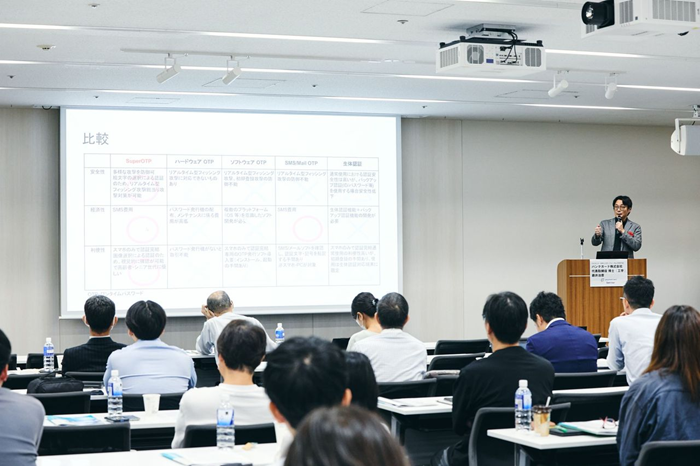
For example, it’s a technology that has proven capable of being rolled out to tens of millions of users all at once. There is no other technology like this. Is there any other technology capable of fully rolling out to 10 million users, or even 30 million users? This technology currently has a total of 75 million active accounts.
To use it, simply enter your ID and password, and a set of options will appear. You’ll receive a few correct emojis via standard SMS or email. On mobile devices, after entering your ID and password, a set of options appears, and the correct answer pops up via SMS or email. This requires absolutely no configuration or changes whatsoever.No configuration changes—it’s quick and easy. That’s why even seniors can use it. This is the most important feature. If you can’t do it or don’t understand, you used to have to call the help desk, spend two hours listening to an operator’s explanation, and then—when you asked them to “try again” a few hours later—find that the representative had already been replaced. This system eliminates that kind of hassle.
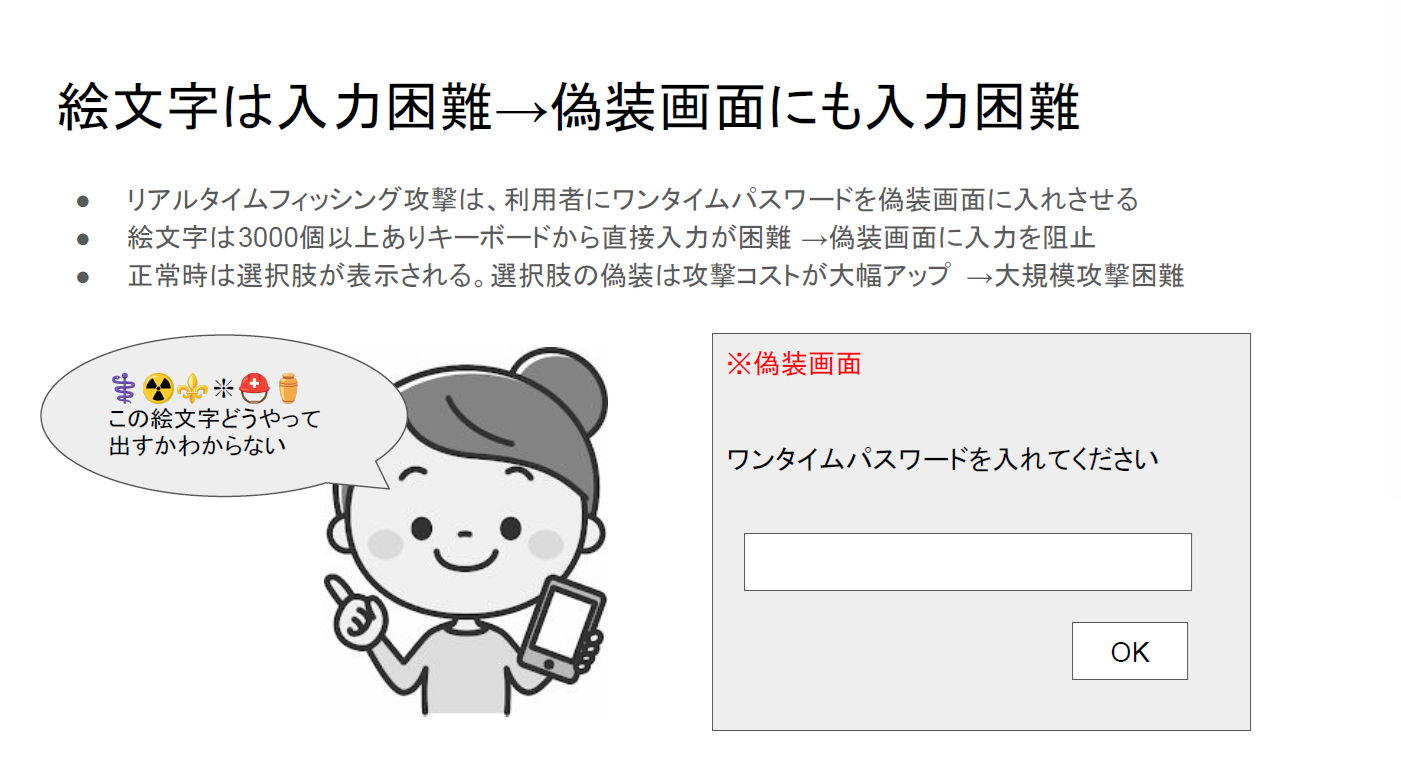
This is the most important point. Since emojis are difficult to type manually, they’re also hard to enter on a fake screen. For example, can you type an emoji like this on a smartphone? I don’t think you can.If you don’t know how to read an emoji, you won’t know how to type it. Even if you type “face,” about 200 options will pop up. Asking someone to type a specific emoji is difficult. Furthermore, since multiple emojis are required, it becomes even more difficult. Because it’s extremely difficult to type them into a phishing screen in real time, this system is secure.
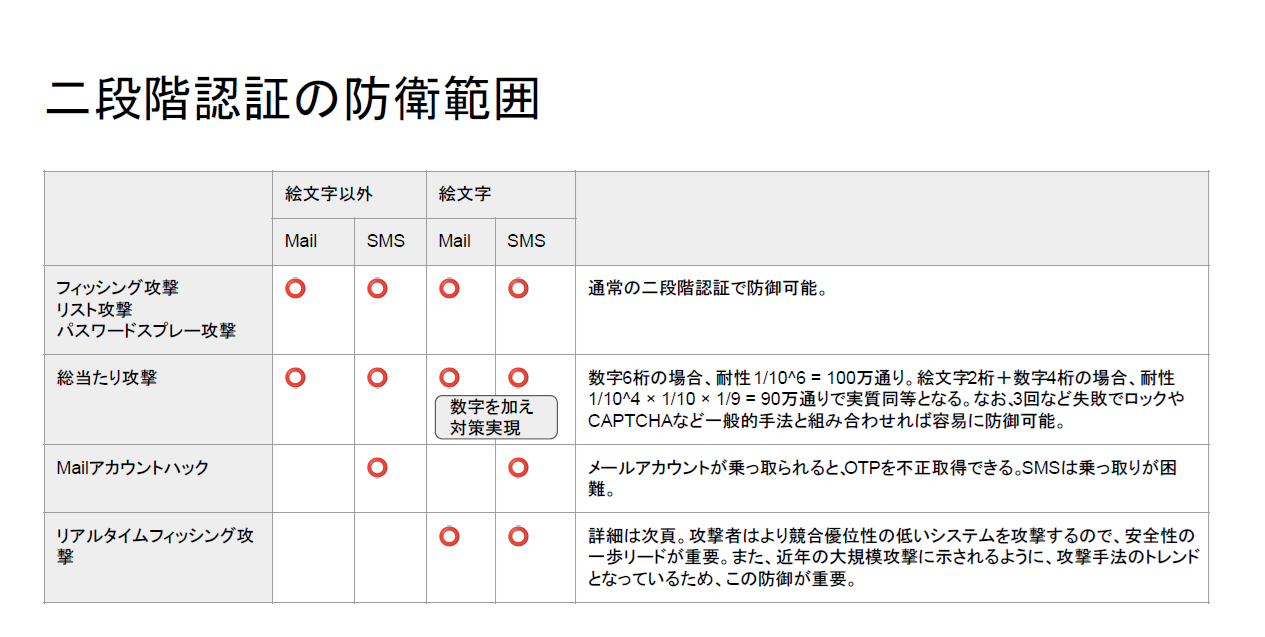
To the question, “Isn’t it enough that manual input is just ‘possible’ rather than ‘impossible’?” I’d answer, “That’s fine.” In information security, “extremely difficult” is a key term. Moreover, since multiple emojis are required, it becomes “extremely difficult.”
There are over 3,000 emojis, making direct input difficult and preventing manual entry on spoofed screens. This is the first key point. Under normal conditions, options are displayed, raising the cost of spoofing those options and making large-scale attacks difficult.
Phishing attacks are “economic attacks”
Attacks are abandoned if the cost-benefit ratio is poor
The cost of creating a spoofed screen with options is also significant. Unlike low-cost attacks—such as real-time phishing attacks that simply display a text form and can be generically applied to any site—spoofing the options incurs a cost.It is extremely important to increase the cost of spoofing these options. There are two costs involved: the cost to the user of manual input and the cost to the hacker of creating the spoofed screen. This is what creates a deterrent effect. Since phishing attacks are economic attacks, attackers will stop if the cost-benefit ratio is unfavorable. Even if a spoofed site goes live, they’ll stop immediately because the cost doesn’t justify the effort.
This method works not only with SMS but also with email. In the email version, images are sent instead of emojis. To elaborate, emojis can be copied and pasted. Some of you might be thinking, “Wouldn’t it be possible to do this by copying and pasting into a text field in real time?”The answer is YES, but this can be prevented. There’s a secret technique that has provided complete protection for tens of millions of users. All you need to do is include a message when sending SMS emojis that says, “Do not copy and paste. Any site that allows copying and pasting is a phishing site.” This ensures users stop doing it entirely, and implementing such operational measures is crucial.
Since the email version uses images, copying and pasting isn’t possible to begin with. As I’ve said many times, it’s just as easy to manage as traditional OTPs. Can everyone—including seniors—use it without a manual? Can you roll it out to 10 million or 30 million users all at once right now? Can you implement it on a full-scale basis? Super OTP is capable of doing exactly that.
For example, you don’t even need a user manual.Anyone can use it, and it’s easy to integrate into existing websites. Any site that previously used OTP can be supported with this technology—including member logins, 3-D Secure, and initial registration or changes to passkeys. Even with new hardware, it’s extremely powerful because the transition can be enforced all at once without requiring initial registration. In short, it allows for a simultaneous rollout.
Can even older adults really use it? We conducted a survey among people in their 70s. We surveyed 100 people, and over 80% said it was easy or very easy. We asked them to try it right away without any explanation, and then asked, “Was it easy?”My own parents are in their 70s, and they send me messages on LINE. It seems using ChatGPT is still a bit too much for them, though. Super OTP is easy for today’s older adults to use.
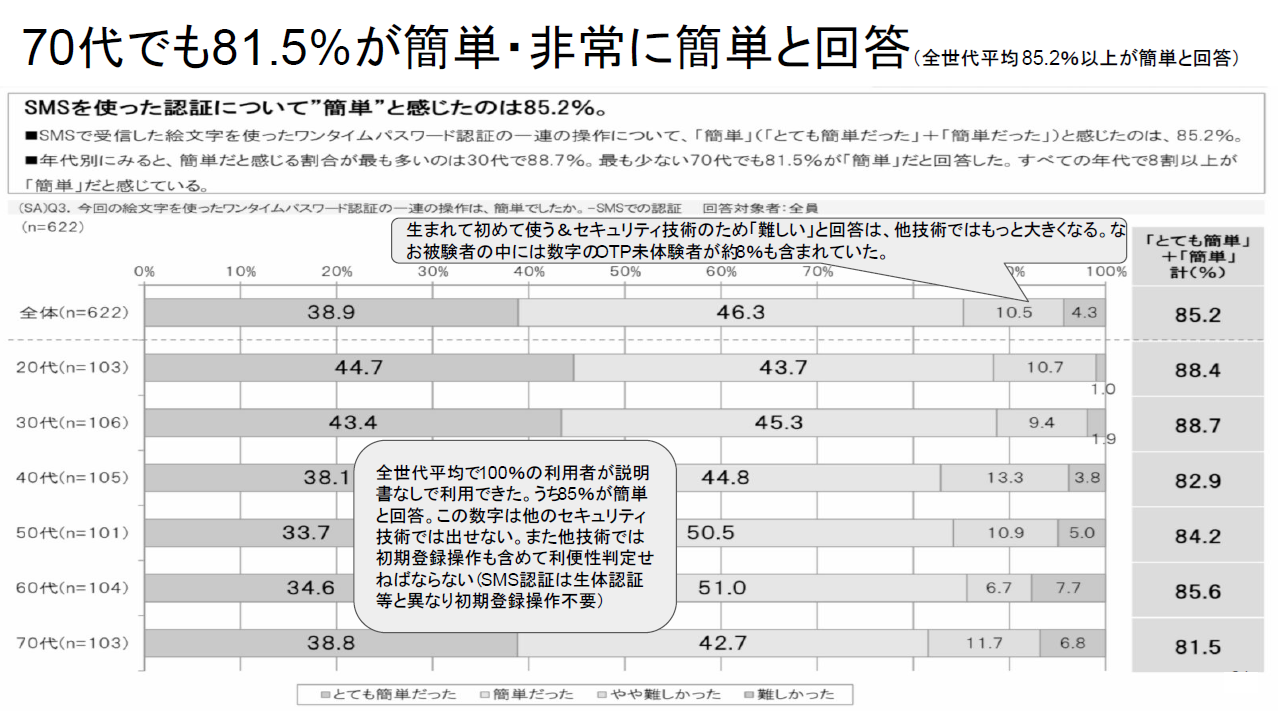
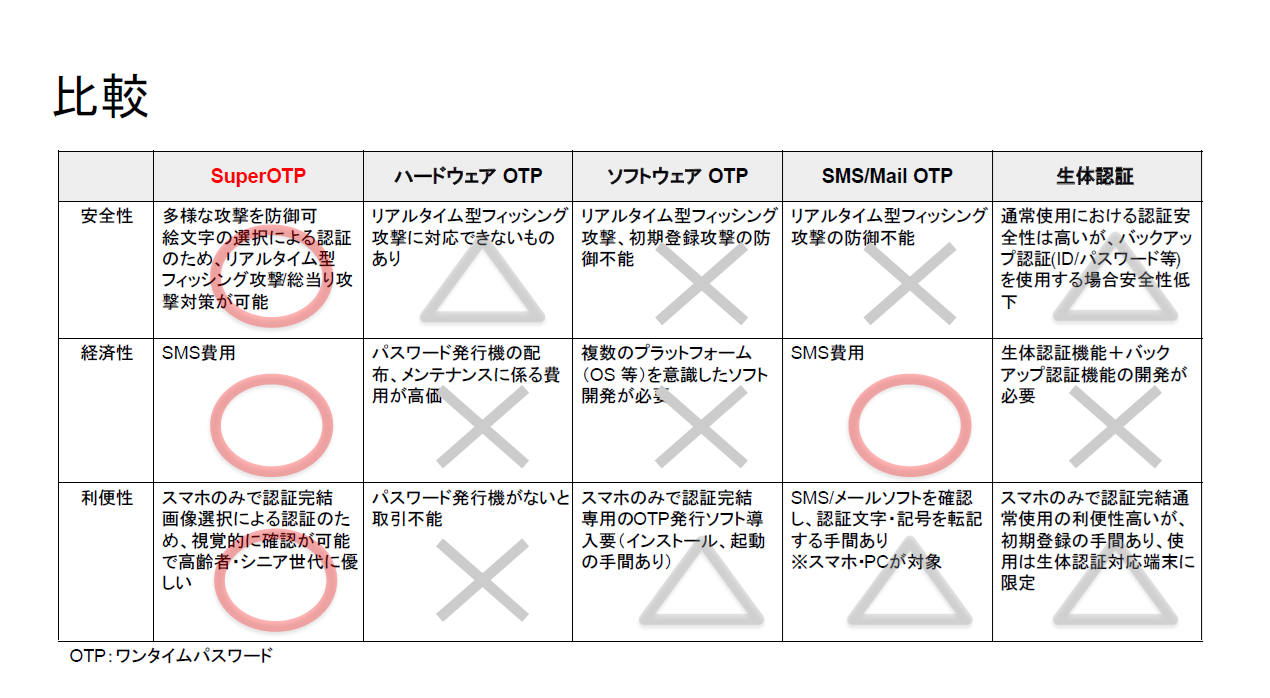
As for security, as long as you don’t use emojis, authenticity is based on the initial registration. It’s the initial registration, not the authentication at every login. That part must be secure; otherwise, you should use emojis.In terms of cost-effectiveness, it’s not about the cost of each login, but rather the cost of getting users to adopt security technology. You can roll it out suddenly one day without the hassle of holding informational sessions. There’s also no need to prepare alternative methods for users who can’t use it.
As for convenience, it’s true that entering emojis does take some effort. (When using online services) some require this every time, while others do not. For example, when you check Gmail, do you enter an OTP every time? No, you don’t. In that sense, it’s more important that the system is immediately usable even if you only log in once every two years.
As for the system, once you integrate the Super OTP SDK into your server, when a user enters their ID and password on their smartphone, the web server sends the mobile phone number to the SDK, which then returns a code consisting of ten emojis.Some patterns may include a few correct emojis or a combination of numbers; the web server then forwards this information to an SMS provider or email server, which displays it on the user’s smartphone for them to select. It’s built to be very straightforward and robust.
There isn’t even a personal information database—simple is best. While the mobile phone number serves as a trigger, the system simply returns a set of options. Regarding its use for member logins, payment authentication, and passkey recovery, it can be implemented either on its own or in combination with other systems.
When implemented on its own—even if used only for member logins, additional authentication via ID and password, or additional authentication via 3-D Secure—I believe it will significantly reduce phishing attacks.Examples include changes to contact information, additional authentication for critical operations, additional SMS verification, and changes to emoji selections. In a combined implementation, passkey-related authentication is used for standard logins, while initial registration, device additions or changes, recovery in case of loss, and support for new users are handled separately. It is implemented in situations requiring identity verification, regardless of whether a passkey is present.
Thank you for your attention.

■Contact
Information  BankGuard
Co., Ltd. URL: www.bkguard.com